Sunsetting inventory - key steps

Dear @instance_managers

As some of you may know, the delivery circle is working on a better and simplified product management experience. As we are approaching another achievement towards the big milestone Network 2.0, here are some important info you need to take into account.

Context

Currently hubs are using admin/products and sometimes also admin/inventory to handle their product info.

Inventory is mainly used when:

  • hubs want to tag their variants
  • hubs want to set a shop with difference stock or price info compared to admin/products

While being quite powerful, this feature as always been source of errors in setting up shops (not to mention you can’t disabling it properly…)

Moreover, it’s not easy to set up and the setup cannot be duplicated: e.g. if you want to set up a dedicated shop for B2B sales, you need to do one inventory per shop and manually set and update all your prices/stock info for as many shops as you have.

Tags on variant

Since v5.0.26 Poppy Seeds, as instance manager you can activate for everyone or some users the ability to add variant tags on admin/products by turning the toggle /admin/feature-toggle/features/variant_tag ON (see below if you don’t know how).

:warning: this work is behind a feature toggle because it’s not finished yet: tags are NOT YET working with tag rules. @rioug is actively working on this. :muscle:
They still are usefull if you want to use them to easily filter the product list. But don’t activate it to users who are using tag rules and might get confused by why they are not working with their existing tag rules. :warning:

Once this is completely released it won’t be necessary to use inventory to have the ability to use tags (apologies I can’t give a date here yet: the team is working under a very tiny budget, with very few hours per week).

Given you can duplicate a variant and tag it towards different consumers, we believe some other scenarios of using inventory will stop as well.

The only inventory features that won’t be possible with variant tags are the one involving permissions from producers to hubs. This is another milestone, but also concerns a smaller share of inventory users.

To avoid the majority of users getting confused by inventory when onboarding we will start to hide the feature for all new users.

Hiding inventory feature

Starting August 11th, all NEWLY REGISTERED users won’t see the inventory feature anymore.

If during their onboarding you feel they need it, you can still activate it to them, by turning the feature toggle ON for them:

  • As super admin go on this page (if you are not connected the page will throw an error 500 to you) : /admin/feature-toggle/features/inventory.

  • There you can conditionally enable the feature for specific users by pressing “add an actor” and then type Spree::User;USERID you can find user IDs in the User menu. Search for an email, select the user, in the URL you will find the ID, example:/admin/users/21179/edit 21179 is the ID here.
    Adding this user means typing Spree::User;21179

  • When you are done you should end up with something like this:
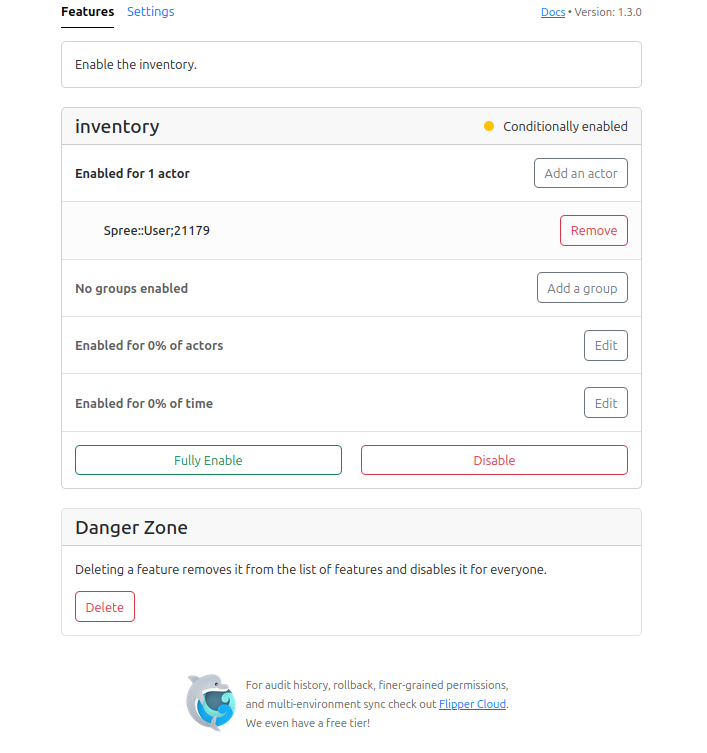
:warning: if you do that PLEASE comment here and tell us why you did it: this will help us understand what are the use cases for inventory we have missed. :pray:

Next steps

One tags on variants will be released, we will go one step further in disabling inventory: we will hide it for all users who are not using it currently.
Each of you will receive a list of users who might be using it (I say might, as we can’t disable the feature once we have started using it we are not sure who is using it :woman_facepalming: ).
At this stage we would love for you to contact them and see if they could start using the product page only or if they really need inventory, and again report the use case here. But more on that later, let’s get variant tags done first!

Please feel free to ask ANY questions here, but also any resources you might produce (e.g. user guide update links). Thank you all for your help on this :hugs: :heart:

1 Like

If users are currently using the inventory feature to tag their products, will these tags transfer onto the Product list page?

Hi @Emma so for August 11th as we are only targeting newly registered users, they will not have used inventory before.

Once tags are released, we will automatically turn inventory off for all those who are not using it.

For the list of users who are using it and for whom using the product page will be easier, I’m afraid we won’t have an automated solution. I guess in many cases people will want to create new variants in the products page and we won’t be able to link those variants to the ones in inventory. But maybe I’m wrong, I will definitely work this through with the team and report back once we know for sure. Thanks for you patience!

Hi @Rachel, exciting stuff!

I have a UK user who currently exclusively manages their products through the inventory whose use case is as follows:

  • Predominantly B2B seller
  • Large product list of ~1000 products
  • Products go in and out of stock frequently
  • Rather than manually update stock levels for all products, or add/remove them from an order cycle, the user instead ‘hides’ and ‘adds’ products to their inventory when they go in and out of stock
  • They use the inventory therefore as a ‘product library’. This minimises their admin and makes their product list much more manageable.

The user was very worried about Inventory not being available in future and having to use Products instead, which they view as challenging because of the size of their products list.

Is there potential to add show/hide functionality to Products, as we currently have in Inventory? We do get feedback in general that the Products list is tricky to use for larger hubs and particularly for seasonal produce (e.g. many vegetables unavailable in winter, but users don’t want to delete them from their products list). Adding a ‘hide’ option would help both for this user’s case but also for other users. I understand that the inventory is essentially another layer on top of a producer/hub’s produce, so can foresee issues with how ‘hide’ would work for a hub with access to a producer’s products, but if it were limited to ‘manage products’ enterprise permissions then this might work…?

Hi @BethanOFN thanks for the feedback!

For a first step, we were thinking that tags could replace the hide feature. As you can basically create a tag that is called “on sale” and filter the product list with this tag only.
Same for seasons, you could create one tags per season. We are working on making tag works with tag rules, but you can also choose to not attach any rules to the tag and just use them to filter the product list (and this is already working in production when you turn the toggle ON).

In the work we are doing on the order cycles, this is also why we added in the brief that we should be able to filter the OC product list by tags.

Now I’m not saying that we can’t add an “available for sales” toggle in admin/products. This exist in other SFS softwares. I just want to make sure this is relevant for us. One interesting aspect is that it could filter the list of products available for OCs beforehand. And reduce the load of products on OC side.

Rather than manually update stock levels for all products, or add/remove them from an order cycle, the user instead ‘hides’ and ‘adds’ products to their inventory when they go in and out of stock

Just to be sure I understand: you mean by this that all their products are “on demand” right?

Just to be sure I understand: you mean by this that all their products are “on demand” right?

No their products are mostly limited stock, but they just maintain a more manageable product list by using show/hide in inventory (e.g. a list of ~300 products in inventory, versus ~800 hidden). Hiding a product from the inventory takes one click, so this is easier than typing in or clicking reduce on the stock count until it’s zeroed and then clicking save. For order cycles, taking the hub themselves (who are also a producer) as a specific example this means that at incoming products they can select from their 53 inventory products rather than the 392 products in their products list, which is far more manageable & quicker to load. I can definitely see the really valuable use case for tags and filtering for seasons and other purposes, but I think that a show/hide toggle would be really valuable for making product lists and OC selections more user friendly.

Side note that I’m very excited about tags & tag rules on variants and I’m looking forward to sharing this with users :raised_hands:

@instance_managers FYI variants tags are currently being tested inside out by the team!

this means that we will soon be able to turn off inventory for all users who are NOT using it. And we will contact you with a list of users to see how we proceed with the next steps.

Stay tuned :slight_smile:

@instance_managers variant tags are now available on /admin/products with the same tag rules. You can activate them with the feature toggle variant_tag.
If you do, remember to de-activate inventory for the same users under the toggle inventory: you can’t use inventory tags and variant tags at the same time.
EDIT: variant tags actually superseed inventory tags so you should be safe here

Aside of this manual set up, here are the next steps we propose to follow:

  • next release variant tags are going to be showed by default for all new users created after August 11th, excluding super admins. We have been hiding inventory by default for them, so they can have access to variant tags safely

  • for all users who are not using inventory at all, we will deactivate the feature in a next release and activate variant tags for them. I will let you know as soon as I know the exact date.

  • for all instances managed by the global team, I’ve sent to support people on slack a csv file listing all owners who might be using inventory and if so if they have been doing tags or not.

I say might be using as we don’t know for sure if they are actively using it or just have tested it and left it aside.

That’s where I need help from your support team: they need to contact these users and understand what are their current needs for inventory.

If you notice variant tags could be enough for these users I suggest to turn inventory off and turn variant tags on. If it is not enough, then please share the use case here so we can understand what feature might be needed to turn inventory completely off.

For now 2 features have been mentioned:

  • the ability to hide products on the product list. We need to define how we want to design this.
  • the ability for distributor to create variants (for users who need to create special products per shop, and have a large number of shops)

However do note that each case is a bit different and maybe some users are using inventory and maybe shouldn’t. It’s a chance to ease their workflow.

Let me know if you have any question. Please do share them here or on Instance Managers slack channel so everyone can benefit :slight_smile:

1 Like

Just to confirm, do we have feature parity for Inventory? Is there a list of features and their progress? (Sorry for all the questions, I’m only now starting to look from a shop user perspective).

From what I understand so far, features provided by Inventory include:

  • Assigning tags to variants
  • Filter the list by tags
  • Show/hide products in the shopfront according to the customer tag
  • Stock level overrides
  • the ability for distributor to create variants (for users who need to create special products per shop, and have a large number of shops)

I believe that the first three have now been implemented, but not the last two, is that right? Is there a migration guide for users? Can we document alternatives for the unsupported features?

The new features don’t seem to be documented yet. The tags guide still only shows Inventory so I think needs updating: Tags and Tag Rules | OFN User Guide.
Before announcing to our users and releasing variant tags, I think we should have a user guide for it.
Also a migration guide for inventory users, so that they can see how it will work and start preparing to migrate.
Also we should add a note to Inventory user guide pages to say that it is deprecated and will be removed in future versions.

So I think these are the key messages that we (and probably all instances) would want to share:

  • All users: there’s a new tagging feature for product variants, it can help manage products and show/hide products in the shopfront according to customer.
  • Non-inventory users: we have detected that you are not using the Inventory screen, and it will be disabled.
  • Inventory users: you will not have the new tagging feature until you are ready to switch away from Inventory. Review the migration guide, and let us know when you’re ready to switch. In the future, once all features have been implemented, Inventory will be switched off.

(of course, we would add more details than this, probably in an email newsletter with pictures).
Does anyone have anything to add to that? I wonder if we can write a generic email with all the key details and share this between instances? (translated into your local language of course).

Sorry, lots of questions and suggestions. Anyone able to address any of these?

Many thanks for all these questions @dcook !

Not entirely:
Stock and price overrides can be achieved with tags: you duplicate the variant, change the stock or price and tag it accordingly to display it where you want.
Of course if the product list is huge and the number of places you need to have specific stock/prices too, this is not a relevant solution.
But maybe inventory isn’t as well. This is why I think we first need to better understand who is using inventory: most of our users aren’t. Those who had to might have good reasons, but these reasons are not entirely obvious.

Regarding the ability for distributor to create variants: inventory does NOT allow that either. Inventory only allows overrides. But overrides are complex to maintain and source of error. We want to stop doing them. One of the solution that also fits other needs is to allow distributors to create (sourced) variants.

While this is needed, I think we need to take this step by step and first understand why some users are using inventory.
I wouldn’t advise to contact all users and tell them we are going to remove a feature. I believe that those who don’t use it will try to test it (pure fomo) and the one who are using it will stress out. In both cases they will pour support with an avalanche of questions.
Here we want to get information first. We are not going to change anything soon for current inventory users, so we can take the time to talk with them and understand their need.
Maybe some will migrate to a better set of fees and commissions. Maybe for others we will open several enterprises.
I don’t think there will be only 1 solution that fit everyone. So we need to gather information and then writing documentation will be easy, with lots of examples / use cases.

I hope this sheds some light on the strategy here. Happy to change anything if we fear this is not going to work!

Thanks for responding so quickly Rachel, especially at this time.

Ok so we don’t need to rush in closing off Inventory.
But a new feature is appearing for the majority of our users. Maybe we avoid announcing it so that Inventory users don’t stress about missing out, but I thought it would be nice to at least have it documented so that people can find out what it’s for. I won’t have time to help with that this week, but maybe we can do that before the following release when all non-inventory users are switched.

So we start the conversation with the Inventory users, any suggestions how to start? I’m thinking a sort of survey with questions, something like:

We are considering removing the inventory screen in a future release (or more vague: “changes to the inventory screen”)

  1. Do you currently use the inventory screen?
  2. Tick all features that you currently use:
    1. Tagging to show/hide products on shopfront
    2. Feature B,
    3. Feature C,
    4. Other:

Probably half will not be using it and we can switch them over.
I realise we may not capture all details in one survey, but it could be a good start, and if all instances use the same questions the data could be helpful. What do you think?

Yes definitely tags on variant need to be described in the user guide :+1:

First I think you might want to browse the list I’ve sent you: maybe a lot of these enterprises do not use OFN anymore. For Evonne in Ireland for example the whole list is in that case.
I thought of querying automatically (e.g. only enterprises with at least one order in 2025), but I’m not sure the rule is perfect and maybe we would have missed some users who have a particular seasonality in their use. What do you think?

The survey is a good idea but if the number of shops to contact is low, I strongly suggest to have a call with the users, so that we can collect more needs rather than yes/no to features. There might be use cases of inventory we are not aware of.
But if you have more than 15 shops to contact, then a quick survey might be easier. Some additional thoughts on content:

Just some feedback from a support person’s perspective - I can tell pretty much immediately, just by glancing through the list of ‘inventory users’ that you sent, that MOST - and perhaps all, are not currently actively using the inventory tool. I suspect this will be the case in many instances. So before we worry a lot about the next steps, we just need to wait for support teams to look at the list.

There are a few on our list where we need to look more closely - if there is a currently active (ie paying fees) user on the list, we can contact them. It won’t be very many.

Also I wanted to ask a question about the plan for where the tagging is going…..

Right now, inventory is used by sellers (distributors) - you identify a ‘shop’ and set the inventory (prices/stock) for products coming into the store, IF the supplier has given the distributor permission. The new tagging in a product list will be done by suppliers - who may or may not be a distributor. So, we need a different way of getting supplier-tagged products into the correct distributor stores (where the supplier is different from the distributor)

For now - we need to hear the use cases from inventory users today so we can figure out the best way forward.

yes, for this I have the feeling that letting distributor create a sourced variant + filtering the OC by tags to easily select products does answer the need?

Within the sourced variant work we need to change the permissions to let producer give permissions to distributors to create variants out of their products or not.

Ha ha - you’ve explained this before, but I don’t think it understood fully until now. I’ll think on this more as I try out tagging, and as I talk to users who use inventory (if there are any).

Inventory use case and some questions:
A distributor currently has hundreds of products in inventory, from multiple suppliers. They use inventory because they share suppliers with another distributor, and each distributor wants to set their own prices and stock. They have a large number of suppliers (200 each) and their total product lists are 2000 or more. Variant tagging will handle this, but the user is worried about the time. They raise these questions:

Currently cloning is for the entire product ‘grouping’, and not for individual variants. If a distributor just wants one variant, they have to clone the grouping and then delete the variants they don’t need. (Some producers have 20 variants under a product). Could we make tagging at the variant level?

Second, any chance for a quicker way for the distributor to clone variants? Could this be a bulk action so: Distributor filters by supplier and supplier’s variant tag, bulk selects, to create a group of sourced variants.

Again - this user is prepared to switch out of inventory and I will help them, but just wondering if there could be a faster way.

It’s 177 long and I’m not familiar enough to filter it down by looking at them, so would like some data to help :wink:

Good idea, I just posted a similar idea in #delivery-circle to ask Gaetan’s help.

@tschumilas for that particular use case, I don’t think using tagging will work. Both distributors would have access to tags created by the other.
For that user, I think you need to leave them on inventory until the sourced variant work is released.

You mean cloning right? Or do you mean tagging at group level? tagging is already at variant level.

Both are nice feature idea, I will add it to the wishlist and see when we can squeeze it in.

@dcook another way to get more information is to compare this list with the list of enterprises you invoice currently for the use of OFN. If you don’t invoice them, there is a good chance that they are not using OFN anymore.

Just wondering how to do this @Rachel ? If I am logged into admin and go to https://openfoodnetwork.ca/admin/feature-toggle/features/inventory I can see that inventory is enabled for all users created before Aug 11 2025, but how do I disable for one user from this group? There doesn’t seem to be a disable toggle to remove one user from the group? I am probably missing something obvious! Thanks!

Thanks, good idea but I found it easier to do a database query than to correlate with our invoices. The query includes the most recent order date, and I can run it on any other instances if desired.

You’re right, it’s not possible, and I need this too! Flipper doesn’t support this, but I think after the next release (specifically #13725), we will be able to enable Variant Tag for these enterprises, to override the Inventory toggle.
I think we could do it per-user or per-enterprise, but I suggest per-enterprise will be easier.

Does that sound right to you Rachel?